भाग 3: वर्कफ़्लो executions को मैनेज करना
AI-सहायता प्राप्त अनुवाद - अधिक जानें और सुधार सुझाएं
जैसे-जैसे तुम पाइपलाइन चलाते और दोबारा चलाते हो, execution history और पुरानी work/ डायरेक्टरियाँ जमा होती जाती हैं।
भाग 1 में तुमने पहले से किए गए काम को skip करने के लिए -resume का उपयोग किया था।
यहाँ तुम सीखोगे कि किसी run के बारे में रिपोर्ट कैसे generate करें, nextflow log से पिछले runs का इतिहास कैसे देखें, और nextflow clean से पुरानी work डायरेक्टरियाँ जिनकी अब ज़रूरत नहीं है, कैसे हटाएँ।
1. पाइपलाइन रिपोर्ट generate करना
Nextflow किसी run के बारे में कई तरह की रिपोर्ट generate कर सकता है, हर एक को अपने -with-* flag से जोड़ा जाता है: एक execution report (-with-report), एक execution timeline (-with-timeline), एक task trace फ़ाइल (-with-trace), और एक वर्कफ़्लो diagram (-with-dag)।
हम यहाँ पहले दो generate करेंगे; बाकी के लिए Nextflow reference में Execution reports देखो।
1.1. Execution report generate करना
किसी भी nextflow run कमांड में -with-report जोड़ो ताकि पाइपलाइन पूरी होने के बाद एक HTML रिपोर्ट generate हो:
कमांड आउटपुट
N E X T F L O W   ~  version 26.04.4

Launching `main.nf` [intergalactic_dalembert] revision: ce74f81996

executor >  local (8)
[34/23f10f] sayHello (2)       | 3 of 3 ✔
[af/cab69d] convertToUpper (3) | 3 of 3 ✔
[9e/d73afb] collectGreetings   | 1 of 1 ✔
[3c/392db0] cowpy              | 1 of 1 ✔

Outputs:

  /workspaces/training/nextflow-run/results

  first_output:
    - batch/intermediates/Bonjour-output.txt
    - batch/intermediates/Hello-output.txt
    - batch/intermediates/Hola-output.txt

  uppercased:
    - batch/intermediates/UPPER-Bonjour-output.txt
    - batch/intermediates/UPPER-Hello-output.txt
    - batch/intermediates/UPPER-Hola-output.txt

  collected: batch/intermediates/COLLECTED-batch-output.txt

  batch_report: batch/batch-report.txt

  cowpy_art: batch/cowpy-COLLECTED-batch-output.txt
Nextflow रिपोर्ट को working डायरेक्टरी में report-<timestamp>.html नाम की फ़ाइल में लिखता है।
इसे browser में खोलो ताकि execution summary, हर task की status और runtime के साथ एक table, और process के अनुसार resource usage charts देख सको।
Tasks tab में हर वह task सूचीबद्ध होती है जो पाइपलाइन ने चलाई, उसके process नाम, status, और resource usage के साथ:
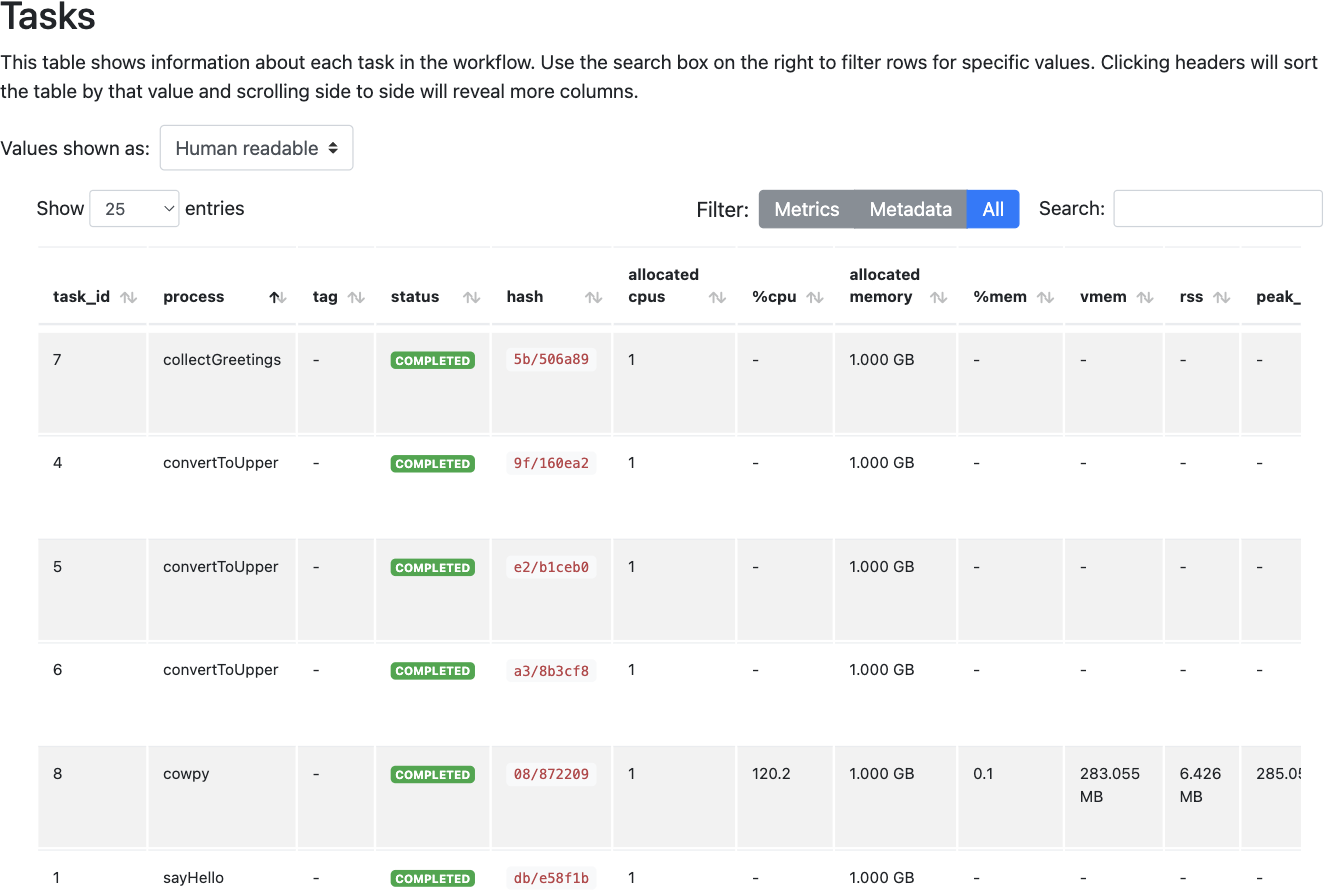
यह रिपोर्ट तब विशेष रूप से उपयोगी होती है जब कोई पाइपलाइन अपेक्षा से अधिक समय लेती है या कोई task fail हो जाती है: task table दिखाती है कि समय कहाँ लगा और कौन सी tasks सफल या असफल रहीं।
1.2. Execution timeline generate करना
किसी run में -with-timeline जोड़ो ताकि यह देख सको कि हर task कब चली, Gantt-chart-style view में:
कमांड आउटपुट
N E X T F L O W   ~  version 26.04.4

Launching `main.nf` [jolly_noyce] revision: ce74f81996

executor >  local (8)
[ad/e92ef3] sayHello (3)       | 3 of 3 ✔
[2a/df8a8d] convertToUpper (2) | 3 of 3 ✔
[be/7fb72a] collectGreetings   | 1 of 1 ✔
[63/dc9bd6] cowpy              | 1 of 1 ✔

Outputs:

  /workspaces/training/nextflow-run/results

  first_output:
    - batch/intermediates/Bonjour-output.txt
    - batch/intermediates/Hello-output.txt
    - batch/intermediates/Hola-output.txt

  uppercased:
    - batch/intermediates/UPPER-Bonjour-output.txt
    - batch/intermediates/UPPER-Hello-output.txt
    - batch/intermediates/UPPER-Hola-output.txt

  collected: batch/intermediates/COLLECTED-batch-output.txt

  batch_report: batch/batch-report.txt

  cowpy_art: batch/cowpy-COLLECTED-batch-output.txt
Nextflow timeline को timeline-<timestamp>.html नाम की फ़ाइल में लिखता है।
इसे browser में खोलो ताकि हर task के लिए एक bar देख सको, जो यह दर्शाता है कि वह कब चली और कितना समय लगा:
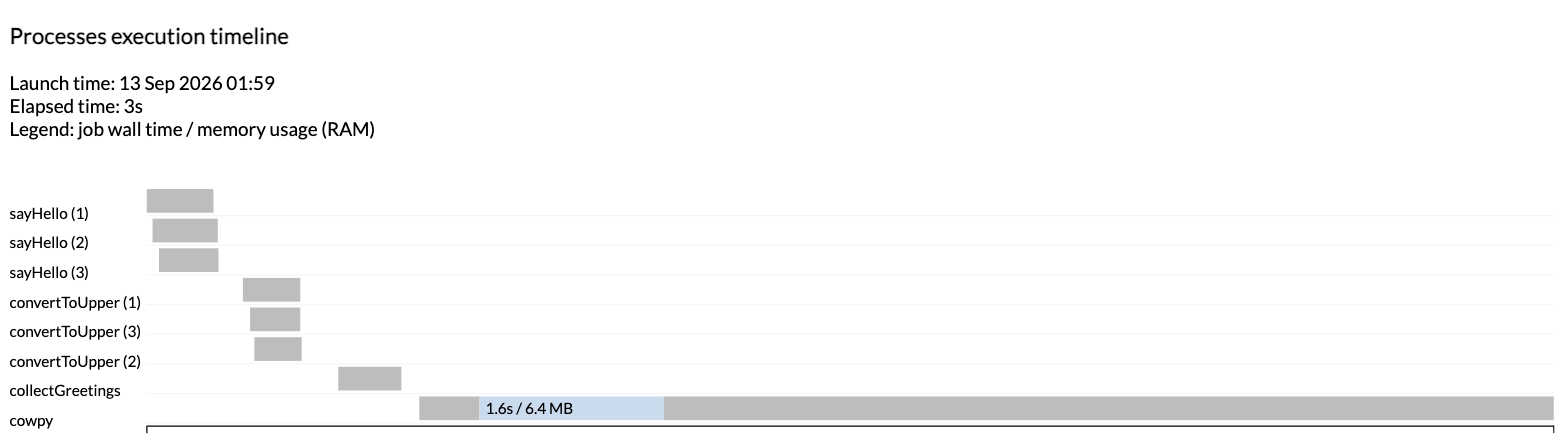
यह timeline भाग 1 से fan-out-then-fan-in आकार को एक नज़र में दिखाती है: तीन sayHello tasks parallel में चलती हैं, फिर तीन convertToUpper tasks, फिर collectGreetings और cowpy एक के बाद एक चलती हैं क्योंकि हर एक अपने से पहले की सभी चीज़ों पर निर्भर है।
सारांश
तुम जानते हो कि -with-report से HTML execution report और -with-timeline से execution timeline कैसे generate करें, और Nextflow द्वारा समर्थित अन्य report types कहाँ देखें।
आगे क्या है?
पिछले runs का इतिहास inspect करना सीखो।
2. पिछले executions का log inspect करना
चाहे तुम पाइपलाइन develop कर रहे हो या उसे production में चला रहे हो, किसी न किसी समय तुम्हें पिछले runs के बारे में जानकारी देखनी होगी।
2.1. History फ़ाइल
हर बार जब तुम Nextflow वर्कफ़्लो launch करते हो, तो current working डायरेक्टरी में .nextflow नाम की एक hidden डायरेक्टरी के अंदर history नाम की एक log फ़ाइल में एक लाइन लिखी जाती है।
फ़ाइल सामग्री
हर लाइन तुम्हें इस डायरेक्टरी से launch किए गए run का timestamp, duration, run name, status, revision ID, session ID, और पूरी कमांड लाइन देती है।
आखिरी दो लाइनें देखो: ये एक ही कमांड के दो अलग-अलग invocations हैं (एक सामान्य, एक -resume के साथ), और दोनों का session ID एक ही है।
Session ID तभी बदलता है जब तुम वास्तव में कोई नया run launch करते हो; -resume का उपयोग करने पर यह वही रहता है, इसी से Nextflow जानता है कि कौन सा cache reuse करना है।
2.2. बेहतर view के लिए nextflow log का उपयोग करना
Raw history फ़ाइल पढ़ना काम करता है, लेकिन nextflow log उसी जानकारी को header के साथ format करता है:
कमांड आउटपुट
Nextflow -resume के लिए उपयोग की जाने वाली caching जानकारी को .nextflow/cache के अंतर्गत, session ID के अनुसार, store करता है।
इसीलिए जब भी तुम्हें किसी पिछले execution की जाँच करनी हो या उसे clean up करना हो, तो सही run name या session ID यहाँ देखना पहला कदम है।
सारांश
तुम जानते हो कि Nextflow पिछले runs का इतिहास कहाँ रिकॉर्ड करता है, और nextflow log से उसे कैसे inspect करें।
आगे क्या है?
पुरानी work डायरेक्टरियाँ जिनकी अब ज़रूरत नहीं है, उन्हें हटाना सीखो।
3. पुरानी work डायरेक्टरियाँ हटाना
हर run अपनी task डायरेक्टरियाँ work/ के अंतर्गत छोड़ जाता है, भले ही तुमने ज़रूरी आउटपुट results/ में copy कर लिए हों।
Development के दौरान पर्याप्त पाइपलाइन चलाओ और वे subdirectories जमा होती जाती हैं, इसलिए Nextflow nextflow clean प्रदान करता है ताकि जिनकी ज़रूरत नहीं है उन्हें हटाया जा सके।
3.1. Deletion criteria तय करना
nextflow clean क्या हटाना है यह चुनने के कई तरीके support करता है; पूरी सूची के लिए reference documentation देखो।
यहाँ तुम किसी दिए गए run से पहले के सभी runs को उसके run name का उपयोग करके हटाओगे।
nextflow log से वह सबसे recent run देखो जिसे तुम रखना चाहते हो; 2.2 के उदाहरण में वह elegant_panini है, -resume वाले run से पहले का आखिरी सामान्य run।
Run name वह machine-generated दो-भाग वाली string है जो Launching (...) console लाइन में, या nextflow log के RUN NAME column में दिखती है।
3.2. Dry run करना
पहले -n जोड़ो ताकि यह जाँच सको कि कोई दी गई कमांड क्या हटाएगी, बिना वास्तव में कुछ हटाए:
कमांड आउटपुट
Would remove /workspaces/training/nextflow-run/work/e5/9ec3fe24deb5d1ffa478dff5e5e1d4
Would remove /workspaces/training/nextflow-run/work/75/36b1ece86b213c331852d0a3dc659b
Would remove /workspaces/training/nextflow-run/work/be/8157808f28699259b5ff37e4bf9f72
Would remove /workspaces/training/nextflow-run/work/f3/d828b7ba6b315eb08e0f96168119f5
Would remove /workspaces/training/nextflow-run/work/94/7a2d7ef67d81b6e66430f300816698
Would remove /workspaces/training/nextflow-run/work/eb/e37c5c8638c45916de3d9794d6d22f
Would remove /workspaces/training/nextflow-run/work/3f/f56a705a6370f6c615aff22d3f240a
Would remove /workspaces/training/nextflow-run/work/25/4922fa35ba2c6087777ddce20e9f2f
Would remove /workspaces/training/nextflow-run/work/a4/2de7bcc2f8fc974261f7280c1480f7
Would remove /workspaces/training/nextflow-run/work/48/8c49bded446d4fcb78c8125318c5e3
Would remove /workspaces/training/nextflow-run/work/8e/c9834a9bdd7c21de2991d959201a9d
Would remove /workspaces/training/nextflow-run/work/d5/a9055dc8c817c6c1f436494685955c
Would remove /workspaces/training/nextflow-run/work/27/9473df9e55e35c8869d9571b480926
Would remove /workspaces/training/nextflow-run/work/d3/ebc066e1d844232b9f5ee0a7d87464
Would remove /workspaces/training/nextflow-run/work/91/17ef1815ed06b8f177d0135d8ef0dc
Would remove /workspaces/training/nextflow-run/work/12/0443f9fcff27a552d4bc73aaedf24a
ये 16 task डायरेक्टरियाँ हैं: turkey run की 8 tasks और tux run की 8 tasks, जितनी इस चार-प्रोसेस पाइपलाइन के दो पूरे runs के लिए अपेक्षित हैं।
elegant_panini run खुद, और -resume run द्वारा उससे reuse की गई cached tasks, अछूती रहती हैं।
तुम्हारे आउटपुट में अलग-अलग डायरेक्टरी नाम होंगे, और तुम्हें कितनी लाइनें मिलती हैं यह इस बात पर निर्भर करता है कि तुमने कितने runs किए हैं; अगर कोई लाइन नहीं दिखती, तो या तो run name तुम्हारे log में किसी से match नहीं करता, या उससे पहले हटाने के लिए कुछ नहीं है।
3.3. Deletion के साथ आगे बढ़ना
एक बार dry run सही लगे, तो उसी कमांड को -n की जगह -f के साथ दोबारा चलाओ:
कमांड आउटपुट
Removed /workspaces/training/nextflow-run/work/e5/9ec3fe24deb5d1ffa478dff5e5e1d4
Removed /workspaces/training/nextflow-run/work/75/36b1ece86b213c331852d0a3dc659b
Removed /workspaces/training/nextflow-run/work/be/8157808f28699259b5ff37e4bf9f72
Removed /workspaces/training/nextflow-run/work/f3/d828b7ba6b315eb08e0f96168119f5
Removed /workspaces/training/nextflow-run/work/94/7a2d7ef67d81b6e66430f300816698
Removed /workspaces/training/nextflow-run/work/eb/e37c5c8638c45916de3d9794d6d22f
Removed /workspaces/training/nextflow-run/work/3f/f56a705a6370f6c615aff22d3f240a
Removed /workspaces/training/nextflow-run/work/25/4922fa35ba2c6087777ddce20e9f2f
Removed /workspaces/training/nextflow-run/work/a4/2de7bcc2f8fc974261f7280c1480f7
Removed /workspaces/training/nextflow-run/work/48/8c49bded446d4fcb78c8125318c5e3
Removed /workspaces/training/nextflow-run/work/8e/c9834a9bdd7c21de2991d959201a9d
Removed /workspaces/training/nextflow-run/work/d5/a9055dc8c817c6c1f436494685955c
Removed /workspaces/training/nextflow-run/work/27/9473df9e55e35c8869d9571b480926
Removed /workspaces/training/nextflow-run/work/d3/ebc066e1d844232b9f5ee0a7d87464
Removed /workspaces/training/nextflow-run/work/91/17ef1815ed06b8f177d0135d8ef0dc
Removed /workspaces/training/nextflow-run/work/12/0443f9fcff27a552d4bc73aaedf24a
nextflow clean task डायरेक्टरियाँ खाली कर देता है लेकिन दो-अक्षर वाली parent डायरेक्टरियाँ (जैसे e5/) वहीं रहने देता है।
चेतावनी
पिछले runs की work डायरेक्टरियाँ हटाने से वे Nextflow के cache से निकल जाती हैं और केवल वहाँ stored कोई भी आउटपुट delete हो जाता है।
इससे Nextflow की संबंधित प्रोसेस को दोबारा चलाए बिना execution resume करने की क्षमता टूट जाती है, इसलिए केवल उन्हीं runs को clean up करो जिनसे तुम्हें resume करने की ज़रूरत नहीं होगी।
यही कारण है कि work/ डायरेक्टरी या symlink publish mode पर निर्भर रहने की बजाय mode 'copy' के साथ results/ में ज़रूरी चीज़ें publish करना उचित है।
सारांश
तुम जानते हो कि nextflow clean से पुरानी work डायरेक्टरियाँ कैसे हटाएँ, और ऐसा करने से उन runs से resume करने की क्षमता क्यों जाती है।
आगे क्या है?
भाग 4 में GitHub जैसे remote repositories से सीधे पाइपलाइन चलाना सीखो।
सारांश
इस भाग में तुमने सीखा:
-with-reportसे HTML execution report और-with-timelineसे execution timeline generate करनाnextflow logसे पिछले runs का इतिहास inspect करनाnextflow cleanसे पुरानी work डायरेक्टरियाँ हटाना, और इसके साथ आने वाले resume trade-off को समझना